Your own app, built with AI
We build all our own apps with AI. Now we do the same for you: for the use cases no product covers, on Salesforce or on your own stack.
We build business apps and the AI inside them: agents that research, read documents, connect your systems and run multi-step processes on their own. We build them on an architecture your team can keep developing with AI after we hand it over.

Project Watch
Scanned sources for your region · new construction projects and the companies involved
Inbox
Quote request in a customer email · draft quote prepared
SpecifiQ
Tender documents · AI extracts bills of quantities into line items
Screens and a data model shaped around how your business runs
Doing the research, reading and routine steps your team does by hand
To Salesforce, your ERP, email and the other tools you already use
Code, documentation, tests and training, so your team can keep developing it
 Salesforce partner since 2018
Inside Salesforce or as its own app?
Both are real options, and we build both. The right one depends on where your people work and where your data lives.
Inside your Salesforce org
- Fits best when
- Your sales team already lives in Salesforce and the app works with accounts, opportunities and project data
- What you own
- The configuration and code we build in your org
- Watch out for
- The app works within the platform's limits and your licence model
As a standalone app
- Fits best when
- Your users don't have Salesforce licences, or the process sits far from the CRM
- What you own
- The full source code
- Watch out for
- One more system to host and operate
Four things AI does well in a business
Each one runs in our own systems today. In your app, they take over the work your team does by hand.
Online data enrichment
AI researches companies, projects and contacts on the web and writes clean, sourced records into your systems.
- Researching new leads and accounts before the first call
- Finding construction projects and the companies involved
- Keeping company data in your CRM up to date
Document parsing
Emails, PDFs, Excel lists and specifications become structured data your team can work with.
| POS | ITEM | QTY | |
|---|---|---|---|
| 10 | Mineral wool board WLG 035 | 420 m² | |
| 20 | Plasterboard 12.5 mm | 1 150 m² | |
| 30 | Fire-rated sealant | ? | CHECK |
- AI turns quote requests into draft quotes
- AI extracts tender documents and bills of quantities into line items
- Order confirmations and delivery notes read into your ERP
System integration
Your CRM, ERP, email and other tools connected, so data moves without anyone re-typing it.
- CRM and ERP in sync: accounts, orders, prices, stock
- Email and calendar linked to your customer records
- Marketing and sales tools feeding one pipeline
Automation
Multi-step processes that run on their own and bring in a person only where a decision is needed.
- Inbound leads researched, scored and routed without manual steps
- Follow-ups created when a project or quote changes
- Reports and documents generated on schedule
The AI prepares. A person decides.
Every app we build follows the same four rules. They keep the AI checkable.
Your material
Reads, researches, drafts
Your team confirms
Your system
It does the routine work.
Research, reading, drafting, sorting. The steps your team repeats every day and would rather not.
A person confirms what matters.
The AI proposes, your team approves, changes or rejects. Nothing important goes out on its own.
Every result shows where it came from.
Enriched data and extracted values come with their source, so a rep can check a claim instead of taking it on trust.
It gets better with your corrections.
The system records each fix your team makes and applies it next time.
Your data.
The app runs in your own infrastructure or in your Salesforce org. Together with your IT, we decide which AI model to use and on which platform, according to your data protection and data residency requirements.
Built with AI, reviewed by people.
AI speeds up drafting, but an architect reviews, tests and takes responsibility for everything that ships.
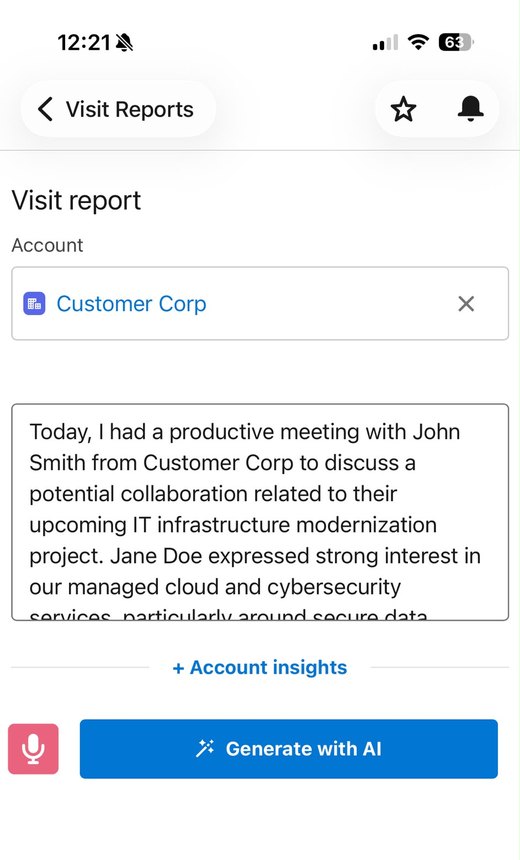
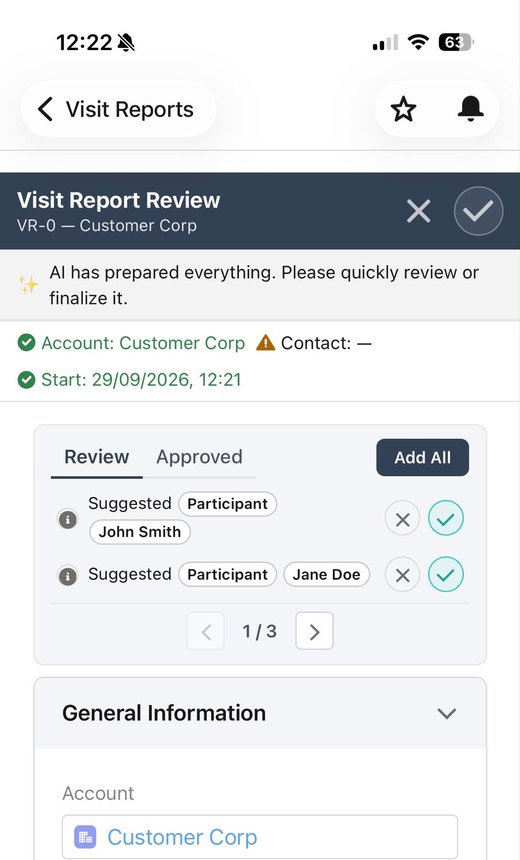
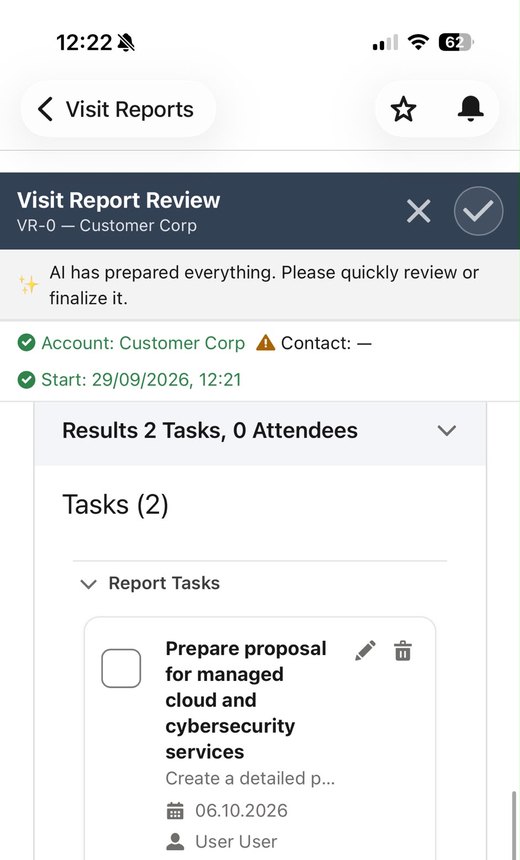
From a spoken note to a finished visit report
This is SalesExt, our AI assistant for field sales reps, built on Salesforce. It shows the pattern every app follows: the AI prepares, a person confirms.

From first call to running software
First call
You describe the use case. We tell you whether it's a Baucore case, a Salesforce case or an own-app case, and whether it's worth building.
30 min · freeBlueprint
We start with your data model and integration points and talk to the people who run the process every day. Fixed scope, fixed fee, fixed end date. At the end you hold a blueprint that says what gets built, where and in what order. It's yours, even if you give it to someone else. Sometimes the recommendation is to build nothing, and the blueprint says so. If we build afterwards, the blueprint fee is credited.
Fixed end dateBuild with AI
Experienced engineers direct AI tools to build fast. You see working software early and steer it while changes are cheap.
Working software within weeksTests & quality
Automated tests your team can run to see whether a change broke something, whoever or whatever made it.
Runs on every changeHandover
Code, documentation, decision records and training, so your team can keep developing the app with AI. We stay available whenever you need us.
Yours to developAt the end you hold a blueprint
What gets built, where and in what order. It's yours, even if you give it to someone else. Sometimes the recommendation is to build nothing, and the blueprint says so.
If we build, the fee is credited
The blueprint fee is credited against the build.
What we need from you
Access to the people who run the process, a few real examples (documents, data, screenshots), and one contact from IT for the integrations.
Common questions about building your own app with AI
Off-the-shelf tools are usually the right call when your process matches how most companies in your position work. Custom software earns its cost when your process sets you apart, or when connecting several off-the-shelf tools costs more in integration and workarounds than building the piece you need.
Timeline depends on scope and integration complexity, not on the tooling used to build it. AI-assisted workflows tend to compress the implementation phase, which is writing and testing code against a defined design, more than discovery, architecture decisions or stakeholder review. Those stay roughly the same length regardless of tooling.
Often, yes, because the mechanical parts of development, such as boilerplate code, test scaffolding and documentation, take less developer time. Not every project gets a discount; complex integrations and unclear requirements drive cost as they did before. The blueprint puts a figure on your case before you commit to a build.
The main risk is unreviewed AI output reaching production: code that runs but that no developer understands or has tested against edge cases. The mitigation: AI accelerates drafting, and a developer reviews, tests and takes responsibility for everything that ships.
It takes over the research reps do before a call or when a lead comes in: finding the company's website, what it makes, where it operates and who the likely contacts are, and writing that into the CRM as structured fields. Good enrichment also scores the lead against your target profile and records its sources, so reps can check a claim instead of taking it on trust.
Modern AI reads emails, PDFs and spreadsheets well, but reliability comes from the process around it: matching extracted items against your own product catalogue, flagging anything uncertain, and having a person approve the result before it goes out. Systems that record each correction get more accurate over time, because they learn which substitutions your team makes.
You do. We hand over the source code with documentation and decision records, so the system doesn't depend on us or on any one person. It runs on your infrastructure or in your Salesforce org, there is no platform licence from us and no component we hold back, and you can hand it to another team.
No. We hand over documented code and train your team, and we stay available if you'd rather not carry it yourself. What you need is someone who owns the application and decides what changes. The knowledge sits in the documentation and decision records, so the system keeps working when people change roles.
Not sure if this is your own app or a Salesforce project?
We'll tell you which fits, before we talk about either. 30 minutes, free of charge: pick a slot in the calendar and meet our team.